


















Table of Contents
Running a therapy clinic involves far more than treating patients.
Between tracking staff hours, staying compliant across locations, managing supply costs, and preparing for audits — clinic owners carry an operational load that most practice management software wasn’t built to handle.
This guide covers the core pillars of PT clinic operations management: labor and productivity tracking, multi-location compliance, inventory control, and financial reporting — with insights from Dmitry Shevchenko, OTR/L, COO of HelloNote, who brings firsthand perspective as both a licensed occupational therapist and a multi-location clinic operator.
Everything covered here is built into HelloNote’s HIPAA-compliant practice management platform — designed specifically for PT, OT, and SLP practices across the United States.
Managing Staff Time and Productivity in a Therapy Clinic
Labor is typically the largest operating expense in any therapy practice — often accounting for 55–70% of total clinic costs. Yet many clinic owners still reconcile staff hours manually at the end of each week, leaving room for errors, disputes, and payroll delays.
HelloNote’s time-tracking system gives clinic owners a real-time view of how hours are being spent — broken down by clinical time (direct patient care) and administrative time (documentation, scheduling, meetings). This distinction matters because productive clinical hours generate revenue, while administrative time, though necessary, must be actively monitored.
Tracking Clinical vs. Administrative Hours
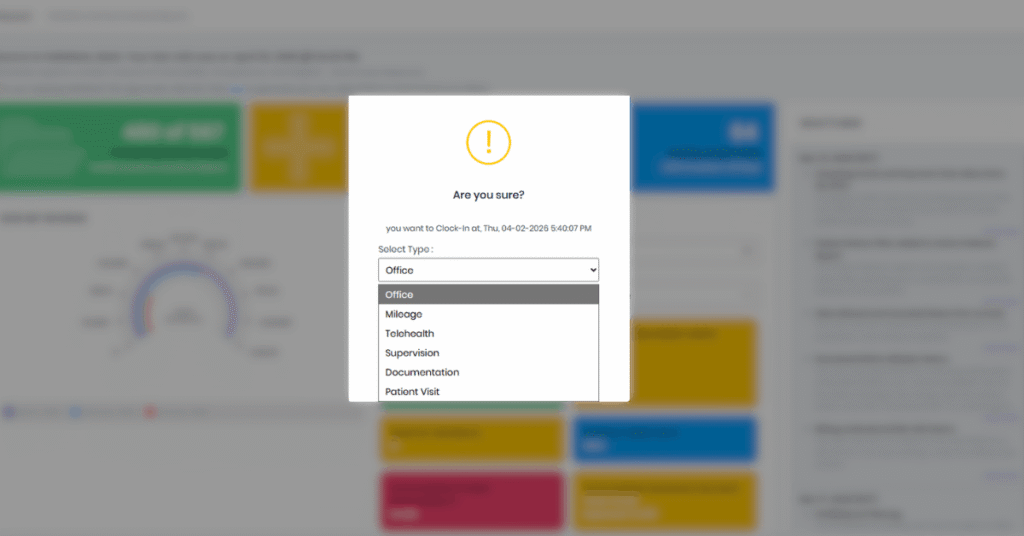
HelloNote’s Clock In / Clock Out system automatically categorizes each logged session. When a staff member clocks in for a patient visit, that time is flagged as productive/clinical. When clocking in for documentation, scheduling, or internal meetings, it is logged as administrative. This separation allows owners and clinical directors to run weekly productivity reports and identify where time is being lost.
How Incomplete Documentation Affects Payroll Accuracy
HelloNote applies a documentation-completion requirement before payroll is processed: if a therapist has unsigned notes, their hours are flagged until the documentation is finalized. This keeps billing records clean and reduces compliance risk tied to unsigned clinical notes.
“Before HelloNote, Friday afternoons were a payroll nightmare. I watched owners scramble between different systems just to figure out how many hours staff worked. Now, Clock In and Clock Out live in the same place as the clinical notes — you eliminate an entire category of administrative error.”
— Dmitry Shevchenko, OTR/L — COO, HelloNote
Staying Compliant Across Multiple Clinic Locations
“Medicare and Medicaid payer audits for PT, OT, and SLP practices are governed by CMS outpatient therapy documentation requirements — making active compliance oversight a financial necessity, not just a best practice.”
What "Compliance Drift" Is and Why It Happens
As therapy practices grow beyond a single location, documentation consistency becomes significantly harder to maintain. Staff at a second or third clinic may develop informal workflows — delaying note completion, skipping required fields, or signing off on documentation without full review. Over time, these small deviations compound into audit risk.
Dmitry Shevchenko calls this pattern “compliance drift” — and he has seen it affect even well-run practices:
“Compliance doesn’t break all at once — it drifts. The most dangerous moment for a growing clinic is when leadership stops actively reviewing what’s happening at other locations. By the time a problem is visible, it’s often already a liability.”
— Dmitry Shevchenko, OTR/L — COO, HelloNote
How to Audit Every Location From One Dashboard
HelloNote’s Global Audit feature consolidates documentation across all clinic locations into a single report view. Owners and administrators can filter by location, therapist, date range, or note status — without switching between accounts or systems.
Recommended workflow for multi-location owners:
- Navigate to Reports → Notes Report
- Clear the Office Filter to view all locations simultaneously
- Sort by note status — prioritize unsigned or incomplete notes
- Set a weekly review cadence (Friday morning works well before the week closes)
This process takes under 10 minutes and creates a documented audit trail that demonstrates active compliance oversight — relevant to both Medicare and Medicaid payer audits.
Inventory Management: The Hidden Cost in Every Therapy Visit
Why Consumable Supplies Are Typically Untracked
Most therapy practices track durable equipment and billable supplies — items like orthotic braces or TENS units. Consumable supplies, however — electrode pads, ultrasound gel, table paper, gloves, and kinesiology tape — are rarely tracked per visit, which means their true cost is almost never factored into per-visit profitability calculations.
Calculating Your True Cost-Per-Visit
“Most owners forget about the consumables. But at 1,000 visits a month, untracked supplies can represent thousands of dollars in unaccounted cost. You may think you’re profitable on a per-visit basis — and you’re not, because you’ve never actually calculated the supply component.”
— Dmitry Shevchenko, OTR/L — COO, HelloNote
HelloNote’s inventory tracking module allows clinics to log all supply categories — including consumables — and associate usage with visit volume. The result is an accurate cost-per-visit figure that accounts for both labor and materials.
What to Track in HelloNote Inventory:
- Electrode pads and TENS supplies
- Ultrasound gel
- Table paper and sanitation supplies
- Athletic tape and kinesiology tape
- Disposable gloves
When stock falls below a set threshold, HelloNote generates a low-inventory alert — reducing the risk of running out of supplies mid-week.
HelloNote Operations Features: Quick Reference
|
HelloNote Feature |
Primary Function |
Operational Benefit |
|
Clock In / Clock Out |
Real-time staff time tracking |
Eliminates manual hour reconciliation; separates clinical vs. admin time |
|
Inventory Management |
Consumable and supply tracking |
Enables accurate cost-per-visit calculation |
|
Revenue Report |
Payment and collections overview |
Distinguishes collected revenue from outstanding claims |
|
Visits Analytics |
Attendance and no-show reporting |
Identifies patient retention issues by therapist or location |
|
Global Audit |
Cross-location note compliance |
Single-view audit trail for multi-office practices |
|
Mileage Tracking |
Home visit distance logging |
Simplifies IRS-compliant mileage reimbursement for mobile clinicians |
Preparing Your Clinic for Payroll, Taxes, and Audits
Mileage Tracking for Home Visit Clinicians
For PT and OT practices that include home health or mobile visit components, IRS-compliant mileage tracking is a documentation requirement — not optional. HelloNote allows clinicians to log mileage at clock-out by selecting the Mileage category and entering odometer readings or distance in the Comments field.
This creates a timestamped, per-clinician mileage record that can be exported directly for tax reporting or reimbursement calculations — eliminating the need for separate mileage apps or manual spreadsheets.
What to Send Your Accountant (and When)
HelloNote’s Revenue Report distinguishes between payments received and outstanding claims — an important distinction for accrual vs. cash-basis accounting. Before your monthly or quarterly accountant review:
- Run the Revenue Report from the Reports dashboard
- Filter by “Payment Received” to isolate collected revenue
- Export the report as a CSV or PDF
- Include the date range and any location filters applied
This gives your accountant a clean, verified picture of actual cash collected — not projected billing — which is what matters for tax preparation.
Key Takeaways: Running a Tighter Therapy Practice
Key Takeaways
- Labor is your largest controllable cost. HelloNote separates clinical and administrative hours in real time, eliminating end-of-week payroll guesswork.
- Compliance drift is a real risk in multi-location practices. The Global Audit dashboard lets owners review documentation status across all offices from one screen.
- Consumable supplies are an invisible cost driver. Tracking them per visit inside HelloNote reveals the true cost of care delivery.
- Mileage and payroll documentation must be structured from the start. HelloNote creates an IRS and HIPAA-compliant record trail without additional apps.
- Clean financial reporting starts with the right filters. Using HelloNote’s “Payment Received” filter gives accountants a verified cash-basis revenue figure.
HelloNote is a HIPAA-compliant, all-in-one practice management EMR built specifically for PT, OT, and SLP clinics — replacing disconnected tools with a single operational platform.
READY TO STREAMLINE YOUR CLINIC?
See How HelloNote Handles All of This in One Platform
Managing staff hours, compliance, inventory, and financial reports — all inside one HIPAA-compliant EMR built for PT, OT, and SLP clinics.
No credit card required · HIPAA Compliant · PT, OT & SLP
Frequently Asked Questions
How do I identify which therapist has the highest no-show rate in HelloNote?
Navigate to Reports → Visits, set your date range, filter by status “No Show,” and group results by therapist. This report helps clinical directors identify which staff may need support with patient communication or scheduling practices.
Does HelloNote support mileage tracking for home health or mobile PT visits?
Yes. Clinicians select the Mileage category at clock-out and log distance or odometer readings in the Comments field. These records are timestamped and exportable for IRS reimbursement reporting.
What is the best way to prepare financial reports for my accountant in HelloNote?
Run the Revenue Report, apply the “Payment Received” filter, and export the file. This isolates collected revenue from pending claims and gives your accountant an accurate cash-basis figure for the reporting period.
Is HelloNote compliant with HIPAA, IRS, and Department of Labor requirements?
HelloNote is built to meet HIPAA privacy and security requirements, IRS documentation standards for mileage and payroll, and DOL labor tracking compliance. It is designed specifically for therapy practices operating under these regulatory frameworks.
Can I manage and audit multiple clinic locations from one HelloNote account?
Yes. The Global Audit feature consolidates note status, documentation compliance, and visit data across all locations into a single dashboard view — without requiring separate logins or reports per office.

AboutDmitry Shevchenko, OTR/L
Dmitry Shevchenko, OTR/L is a licensed Occupational Therapist
and the COO of HelloNote EMR. With firsthand experience as both
a practicing clinician and a multi-location clinic operator,
Dmitry brings a unique operational perspective to HelloNote's
product development — having navigated the exact payroll,
compliance, and inventory challenges this platform is built
to solve.